Myntra will be offering some great deals and discounts on fashion and accessories on almost all categories and groups in its Fashion Weekender Sale (26 – 27th Nov). Myntra is going to run an offer in coming week, called Myntra Fashion Weekender Sale (26 – 27th Nov), Get wide range of products at Great discount, To get more info here are the steps How to get:-
LeMall is offering “LeMall For All” Sale- Deals You Can’t Miss from 23 – 25 Nov. Get great discount on Mobiles, TVs & Accessories. Also get Up to Rs.4000 Cashback on All Debit/Credit Cards & 12 Months No Extra Cost EMI on HDFC Credit Cards.
Additional Offers:-
Up to Rs.4000 Cashback on All Debit/Credit Cards
12 Months No Extra Cost EMI on HDFC Credit Cards*
How to Buy Mobiles, TVs & Accessories from LeMall For All Sale :-
Paytm India’s largest marketplace and mobile commerce platform after Diwali sale has come again with back to back fun and savings with The Big Cashback Sale (22- 24 Nov’16).
Download PhotoScan by GOogle Photos App Usign Apk or Google Playstore Link. PhotoScan is a new scanner app from Google Photos that lets you scan and save your favourite printed photos using your phone’s camera.
Don’t just take a picture of a picture. Create enhanced digital scans, with automatic edge detection, perspective correction, and smart rotation.
Picture perfect and glare-free
PhotoScan stitches multiple images together to remove glare and improve the quality of your scans.
Stay organized with Google Photos
Get the free Google Photos app to keep your scans safe, searchable, and organized – even by the people and things in them. Plus, bring your scans to life with movies, filters, and advanced editing controls.
Picture perfect and glare-free
Don’t just take a picture of a picture. Create enhanced digital scans, wherever your photos are.
Get glare-free scans with an easy step-by-step capture flow
Automatic cropping based on edge detection
Straight, rectangular scans with perspective correction
Smart rotation, so your photos stay the right way up, no matter which way you scan them
Scan in seconds
Capture your favourite printed photos quickly and easily, so you can spend less time editing and more time looking at your bad childhood haircut. Safe and searchable with Google Photos
Back up your scans with the free Google Photos app to keep them safe, searchable, and organised. Bring your scans to life with movies, filters and advanced editing controls. And share them with anyone, just by sending a link.
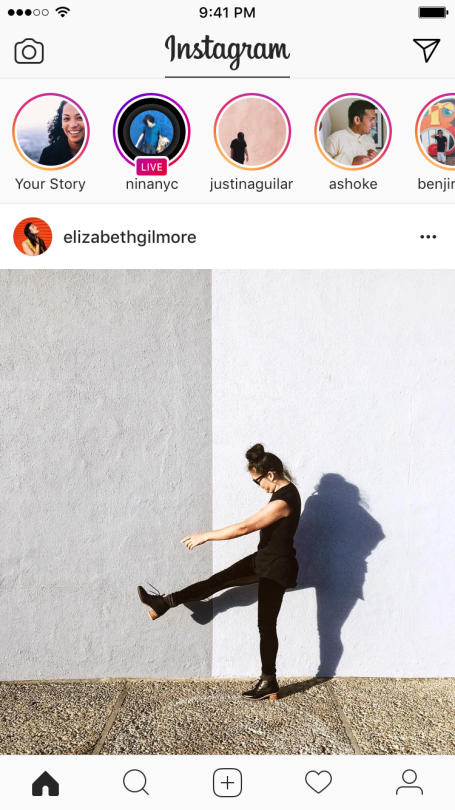
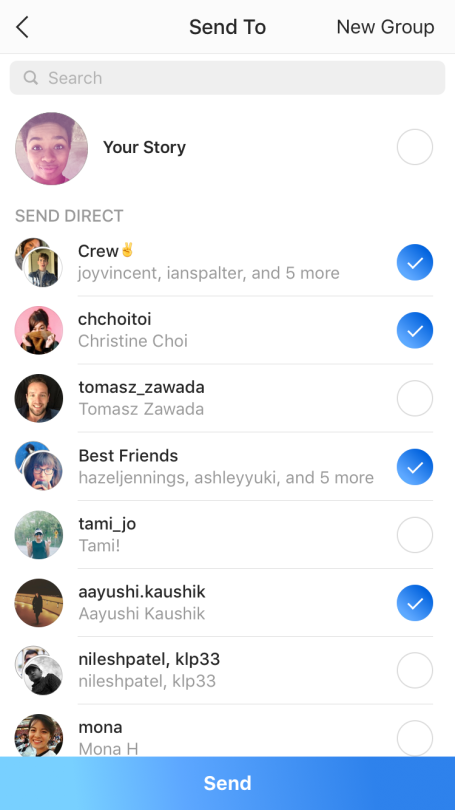
How to Use Instagram Live Steaming, Video & Messages. New Ways to Share in the Moment. Instagram launches disappearing Live video and messages. Today we’re announcing two updates: live video on Instagram Stories and disappearing photos and videos for groups and friends in Instagram Direct.
In August, we introduced Instagram Stories as a way to share all the moments of your day, not just the ones you want to keep on your profile. We’ve seen stories open up a new side of what people share on Instagram, and now over 100 million people use it every day. With today’s announcement, you’ll soon have two more ways to share freely and in the moment.
Announcing Live Video on Instagram Stories :-
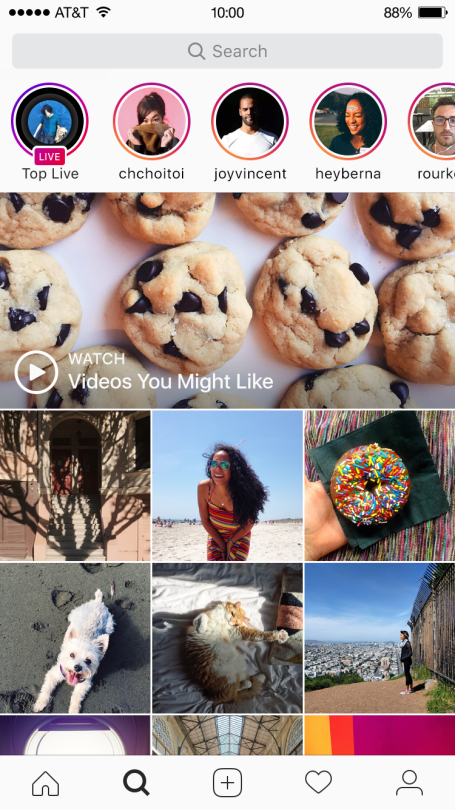
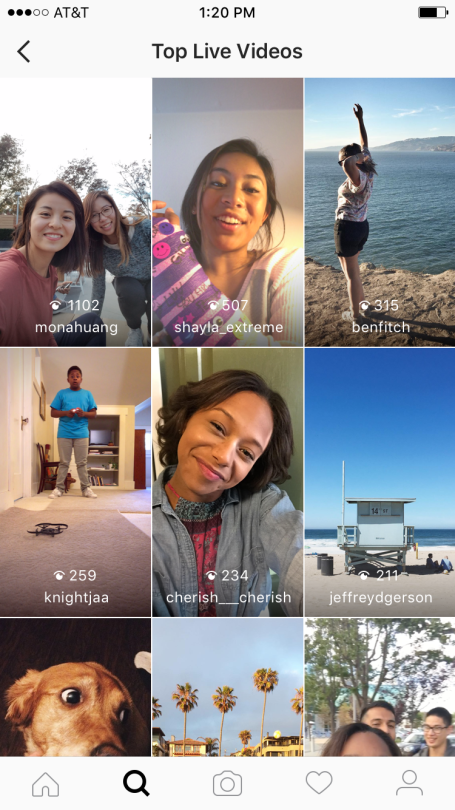
Live video on Instagram Stories helps you connect with your friends and followers right now. When you’re done, your live story disappears from the app so you can feel more comfortable sharing anything, anytime.
It’s easy to go live — just swipe right from feed to open the camera, tap the “Start Live Video” button and start sharing for up to an hour. Your friends may get a notification when you go live so they can tune in. While you’re live, you can pin a comment for everyone to see or turn comments off altogether.
Live video on Instagram Stories and Explore will be rolling out globally over the next few weeks.
Launching Disappearing Photos and Videos for Groups and Friends in Instagram Direct
Now you can send disappearing photos and videos directly to groups and individual friends in a spontaneous, pressure-free way.
Since launching improvements to Instagram Direct last year, the number of people using Direct each month has grown from 80 million to 300 million people around the world. In fact, many of them use group threads every day to stay in touch with their closest friends and family.
Today’s update keeps regular direct messages the same and adds a more visual way to connect with your closest friends — all in one convenient place.
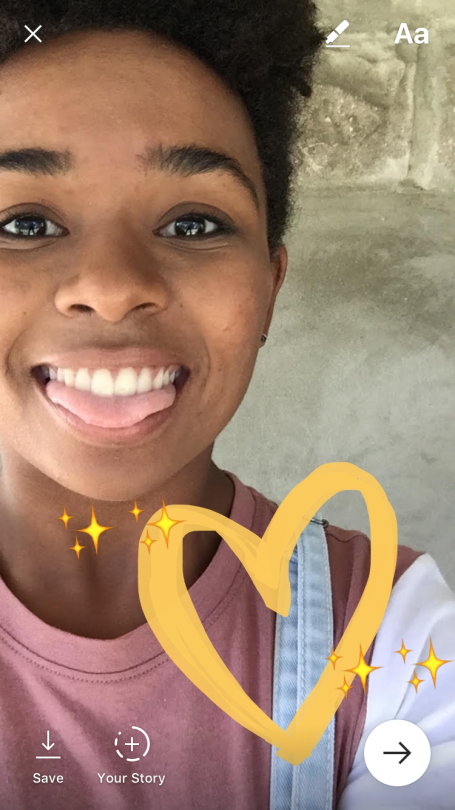
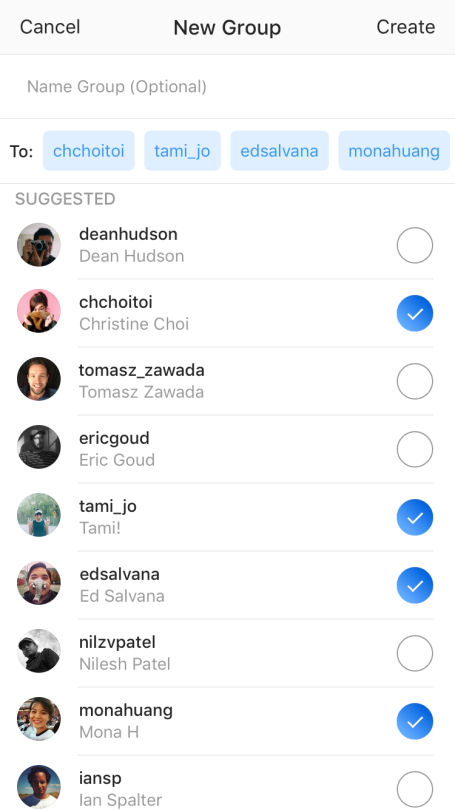
Swipe right into the camera to take a photo or video, then tap the arrow to send it privately. You can choose a group or create one in just a few taps — and you can also send to individual friends at the same time. Send anything you want, from inside jokes to your worst selfies. Unlike other messages in Direct, these photos and videos disappear from your friends’ inboxes after they have seen them. And you’ll see if they replayed it or took a screenshot.
Whether your account is set to public or private, you can only send disappearing photos and videos to people who follow you.
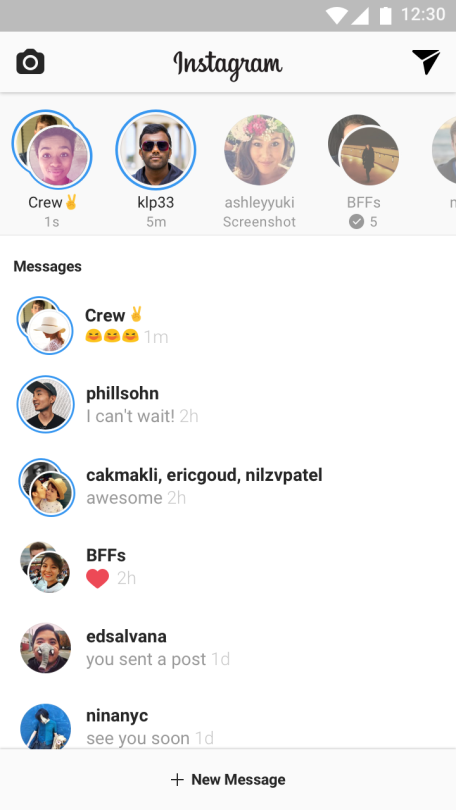
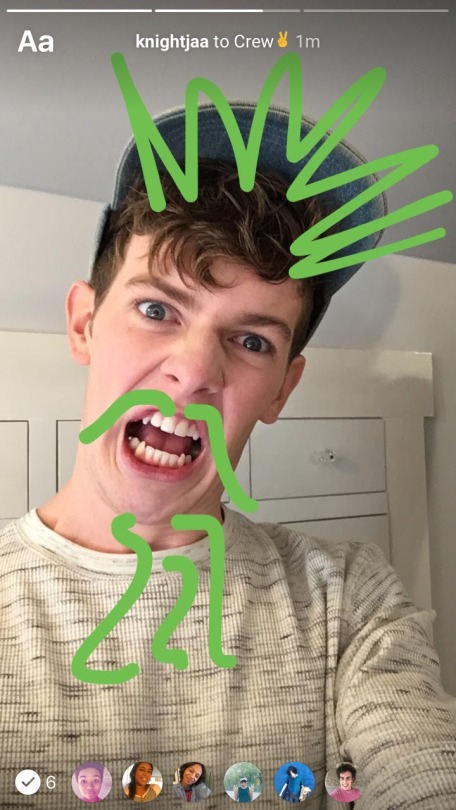
To open your inbox, tap the new paper airplane icon at the top right corner of your feed or swipe left. You’ll see disappearing photos and videos in a bar at the top. Tap the ones with blue rings to see what your friends sent you. In a group, you can see everyone’s responses — and who else has seen them — in a slideshow format. Then when you’re done, just tap their faded profile photo to send a quick response.
Disappearing photos and videos in Instagram Direct will start rolling out globally today.
Download FirstHandle App & Get Rs.10 + Refer & Earn Rs.20 Per Referral. FirstHandle App Referral Code :- Get Signup Bonus worth Rs 10 and Refer and Earn Rs 20 per Referral enjoy this offer share this app friends and family member.
Enter given refer code here to get Rs.5 Sign Up Bonus : 8B61231A
You will get Rs.5 Instantly on Sign Up.
Go to Refer and Earn tab and Copy your refer code and share it with your Friends.
You will get Rs.20 per refer when your friend will use your refer code. Minimum Redemption amount is Rs.10 so you have to only refer one friend and you will get a recharge of Rs.20
Script To Buy Vu 102cm (40) Full HD Smart LED TV Registration Is Open For First Sale On 24 November At 12 Noon. This Phone Is Not Available On Flipkart At This Time. VU fans, you know you want this! Available — VU Full HD Smart LED TV Full HD | 1920 x 1080 Resolution, 178(H) degree Viewing Angle, 16 W Speaker Output & other excellent features.Below we have given a trick and method to buy Vu Full HD Smart LED TV from Flipkart. successfully in respective Flash Sales which is being held on 24 November 2016 on Flipkart. Buy VU Full HD Smart LED TV on Flipkart will be add on 24 November 2016.
How To Buy VU Full HD Smart LED TV From Flipkart In Flash Sale :-
Trick to Buy Vu Full HD Smart LED TV Successfully on Flipkart :-
After registration successfully on Flipkart website we will make a trick on the Flipkart website dont be panic you not required knowledge of coding just follow steps i have given.Curious About what is Trick actually:-
We will make a Trick which we will place in google chrome browser where we gives a order about when buy now button appear auto-click on it and it will go to cart thats it . we are doing his because the Trick will do this task in millisecond and a human can not do so fast.
Necessary Requirements for Trick to work perfectly !!
To do so simply right click on Date and Time present in bottom right corner on Taskbar.
Then click on “Adjust date/time”, a popup box will appear.
Click on “Internet Time” tab and then click on “Change Settings”.
Tick mark on “Synchronize with an Internet Time Server”.
Choose “time.nist.gov” from dropdown menu.
Finally click on “Update Now” button and click on Ok.
Make sure to have a good internet speed. Activate any 3G plan for best result.
Close all background updates.
Note: For a safe side, open above link in two tabs, apply Trick in one tab and click manually in second tab.
How to use Vu Full HD Smart LED TV Trick ?
Click Here to go to Flipkart Vu Full HD Smart LED TV countdown timer page.
Now after completely loading of page, right click anywhere on the page.
Now click on “Inspect Element” shown last in the options. Or else you can also press Ctrl + Shift + I.
A popup window will appear from bottom.
Their you will find a “Console” tab, click on it.
Paste the above given Vu Full HD Smart LED TV Trick in the box. (Ctrl + V)
Finally hit on Enter button (Keyboard) approx. 5 minutes before sale.
Now wait for the Trick to do its work of adding Vu Full HD Smart LED TV to your cart.
After successful adding Vu Full HD Smart LED TV to cart, go ahead for payment procedure.
Important Note
We highly recommend that you get the product installed by the brand/Flipkart authorized service engineers to prevent the warranty from getting void. Use a Stabilizer to protect your Television, in case there are Regular Voltage Fluctuation in your Location. To avoid any physical damage to the product while unboxing, please ensure that only an authorised personnel opens the packaging and installs it.
Description
Netflix and chill on this 102 cm Vu Smart LED TV right from the comfort of your home. Enjoy the immersive, high-resolution, and high-quality movie experience that the Full HD display brings to the table. The TV’s 178-degree wide viewing angle is a treat in itself.
Vu Full HD Smart LED TV Specifications
General
Sales Package
TV Unit, Remote, 2 AAA Batteries, Power Cord, Cable Tie, User Manual, Vesa Wall Mount Dimensions (Horiz / Vert): 200 x 200 mm
Model Name
H40K311
Display Size
102 cm (40)
Screen Type
LED
HD Technology & Resolution
Full HD, 1920 x 1080
3D
No
Smart TV
Yes
Curve TV
No
Touchscreen
No
Motion Sensor
No
HDMI
2
USB
2
Built In Wi-Fi
Yes
Launch Year
2016
Internet Features
Built In Wi-Fi
Yes
Wireless Ready
Yes
Mobile High-Definition Link
Yes
3G Dongle Plug and Play
No
Ethernet (RJ45)
1
Other Internet Features
Any View Streaming (Mirroring)
Opera Web Browser
Opera TV Store
YouTube, Netflix, Kidoz
Facebook, AccuWeather
Internet Television (IPTV)
Any View Cast
Connectivity Features
HDMI
Back
USB
Location: Back
Headphone Jack
3.5 mm Headphone Jack: 1
RF Connectivity Input
1
Other Connectivity Features
Wireless IEEE802.11: b, g, n / 2.4 GHz
Network Ethernet Port
Component / Y Pb (Cb) Pr (Cr): 1
Audio L / R for Component Input (Shared with AV Input): 1
AV Input (Shared): 1
Optical Digital Audio Output (SPDIF): 1
Earphone Jack
HDMI Features: CEC, ARC
Video Features
Brightness
450 cd/m²
Contrast Ratio
706.6673611 (Dynamic)
Digital TV Reception
Television Standard in VHF Band / UHF Band: DVB – T / T2 / C
View Angle
178(H) degree
LED Display Type
DLED
Aspect Ratio
4:3, 16:9, Auto, Zoom 1, Zoom 2
Refresh Rate
60 Hz
Supported Video Formats
MPEG / H.264 / H.265
Other Video Features
1:1 Pixel Mapping
Backlight Control
Adaptive Backlight
Digital Noise Reduction
Smooth Motion Rate: 120 Hz
Movies Support in USB Mode
Local Dimming
Response Time: 8 ms
Digital Media Player (DMP) Content: Video
Audio Features
Number of Speakers
4
Speaker Type
Tweeter, Midrange
Sound Technology
Dolby Digital
Speaker Output RMS
16
Other Audio Features
Audio Enhancement Type: Digital DBX Sound
Total Surround
Automatic Volume Level (AVL)
Audio Equalizer
Lip-sync Adjustment
Digital Media Player (DMP) Content: Music
Convenience Features
Sleep Timer
Yes
On/Off Timer
Yes
Child Lock
Yes
Other Convenience Features
Late Night Mode, Electronic Programming Guide (EPG), No Signal Power Off, Child and Program Lock, Favorite Channels List
Power Features
Power Requirement
AC 100 – 240 V, 50/60 Hz
Power Consumption
70 W, 0.5 W (Stand By)
Remote Control Features
Touch Remote
No
RF Capable
Yes
Battery Type
2 AAA Batteries
Other Remote Control Features
Remote Controller Technology: IR
Additional Features
A+ Grade Panel
Achromatic Panel
Wide Viewing Angle
Quad Core Processor
Games Center
Micro Lens Optical Design
DivX Decoder
RF Signal Strength Indicator
RF Signal Quality Indicator
Digital Media Player (DMP) Content: Photos
DMP File Allocation Table: FAT / FAT32 / NTFS
Environmental Condition – Temperature: 5°C – 45°C
Environmental Condition – Humidity: 20% to 80% RH
Table Top Mount Stand
Dimensions
Width x Height x Depth (without stand)
917 mm x 537 mm x 90 mm
Weight (without stand)
7.3 kg
Width x Height x Depth (with stand)
917 mm x 573 mm x 206 mm
Weight (with stand)
7.5 kg
Warranty
Warranty Summary
3 Years Vu Domestic Warranty
Covered in Warranty
Manufacturing Defects Covered in Warranty. Parts & Labor Costs are Covered
Not Covered in Warranty
The Product is not Used According to Instructions Given in the Instruction Manual. Defects Caused By Improper Use as Determined By the Company Personnel. Modification or Alteration of Any Nature is Made in the Electrical Circuitry / or Physical Construction of the Set. Installation / Repair Work is Carried Out By Persons / Agency Other Than Authorized By the Company. Site (Premises Where The Product is Kept) Conditions that do not Confirm to the Recommended Operating Conditions of The Machine. The Original Serial Number is Removed, Obliterated Or Altered from the Machine Or Cabinet. Defects due to Cause Beyond Control Like Lightning, Abnormal Voltage, Acts of God or While in Transit to Service Center or Purchasers Residence. The Warranty Does Not Cover Any External Accessories (Such as Battery, Cable, Carrying Bag Etc.) Mentioned in the Operating Instruction Manual Supplied with this Product or Any Cosmetic Parts
Installation & Demo
Installation & Demo Details
We’ll facilitate the installation and demo through authorized service engineer at your convenience. The installation will be done within 2 to 5 Business days of delivery of the TV. The service engineer will install your new TV, either on wall mount or on table top. Installation and demo are provided free of cost. The engineer will also help you understand your new TV’s features. The process generally covers: Wall-mounted or table-top installation, as requested (Wall mounted mode is recommended for better sound experience), Physical check of all ports, including power and USB ports. Accessories also checked, Demonstration of features and settings, Quick run-through on how to operate the TV.
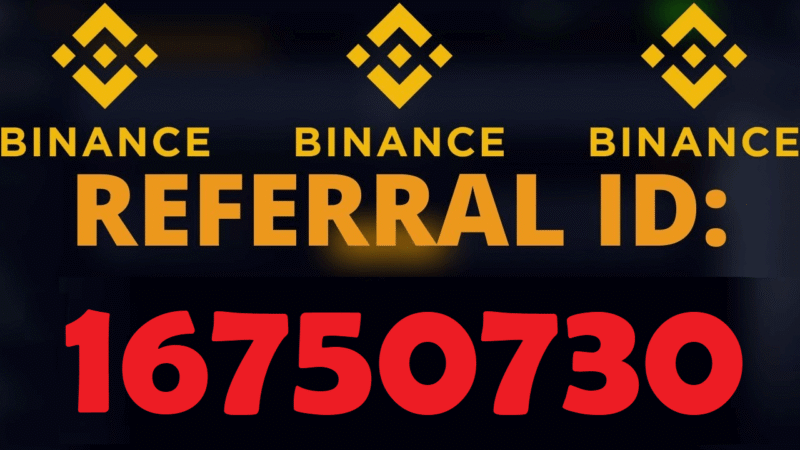
Binance Referral Id: 16750730 Binance Crypto Exchange Refer and Earn Program to Get Flat 50% OFF For Binance New Users Use Binance Referral Id Code: 16750730 Singup. You can Earn Unlimited Bitcoins Free Using This Binance Referral Program and when you buy or sell on binance you will get 50% of there transaction fee. Binance is commited to provide to its user and the entire industry with professional, safe, transparent one-stop services of digital assets.
[copy text=”Click to copy Binanace Referral ID 16750730″ content=”16750730″]
Binance cryptocurrency exchange – We operate the worlds biggest bitcoin exchange and altcoin crypto exchange in the world by volume. All the power of Binance’s cryptocurrency exchange, in the palm of your hand. Download the Binance mobile crypto trading app today. https://accounts.binance.com/en/register?ref=16750730 Binance Referral Id: 16750730
Binance Referral Id: 16750730 Already familiar with Bitcoin and Ethereum? Then you should be interested in altcoins with potential to 10x in price! On Binance you can trade a huge quantity of different coins like Bitcoin, Ethereum, Litecoin, IOTA and dozens of other crypto currencies. The platform is available in Chinese, English, Japanese and Korean. To Register click the the link below: www.binance.com/?ref=16750730
Click the “Binance Referral Program” For Web Users
Register with New Account Enter Binance Referral id: 16750730
After Register Go to Mail & Verify Your Account
After Verify Login in to Binance Account
Buy Bitcoin You will Get Flat 50% OFF
Share the referral rewards program with friends using: QR Code, Referrer ID or Referral Link.
After your friends successfully register at Binance.com and start trading, you will receive a 50%commission of his/her trading fee in real-time during the first month of our promotion. You can check the Referral Friends, Estimated Commission Value, Latest Commision History on the event page.
The rate of commission will initially be set at a of 50%. This will then be adjusted based on the situation.
That’s it Enjoy
Binance Refer and Earn Bitcoin:
Open Binance Account After Above Step
Go to Menu You will See Refer and Earn option tap on
You will See Your own Binance Referral Id: 16750730
Share this Referral id with your friends and family
Share Your Code into the Comment box to Earn Bitcoins
That’s it Enjoy
Binance is a cryptocurrency exchange which is currently the largest exchange in the world in terms of daily trading volume of cryptocurrencies. It was founded in 2017 and is registered in the Cayman Islands. Binance was founded by Changpeng Zhao, a developer who had previously created high frequency trading software.
Binance Referral Program Commission Fee Rate:
The commission you receive from the referral program will initially be set at a rate of 50%. This will then be adjusted after a certain period of time based on the situation.
The fee commission will be sent instantly in real-time to your Binance account as your referee completes each trade and will be paid to you in whatever token/cryptocurrency the original fee was paid in.
There is no limit to the number of friends you can refer, although we do reserve the right to adjust or change the referral program rules at any time.
The referee must be signed up through your Referral Link, QR Code or Referral ID.
We will check for duplicate or fake accounts and will not pay out referral bonuses on these accounts. Duplicate or shared finances will result in disqualification.
Binance Crypto Exchange Offers:
Deposit & withdraw at anytime, anywhere.
Swift deposits & withdrawals.
24 hrs bilingual customer services.
Binance Referral Id: 16750730
Welcome to the World’s #1 cryptocurrency platform by trading volume! The State Hermitage Museum and Binance NFT, the NFT marketplace of the world’s leading blockchain ecosystem Binance, announced their cooperation in the creation and release of tokenized art from the museum collection! Trusted by millions of users worldwide. Get started today and buy Bitcoin, Ethereum, Link, Tezos, Cardano, Binance Coin, MOBOX (MBOX), and more, all with some of the lowest fees in crypto. Binance App is available only to non-U.S. citizens and residents. For U.S. citizens and residents, please install Binance. US App. Binance Referral Id: 16750730
Binance cryptocurrency exchange – We operate the worlds biggest bitcoin exchange and altcoin crypto exchange in the world by volume. Binance is designed to appeal to as many users as possible. The exchange is simple enough for newbies to use, and offers enough coins and features to keep expert traders happy, as well. I would recommend Binance to crypto traders of almost every level of experience.
Binance offers a relatively secure, versatile way to invest in and trade cryptocurrencies. Binance could be overwhelming for beginners and experienced traders alike. Binance offers lower fees than many other cryptocurrency exchanges.
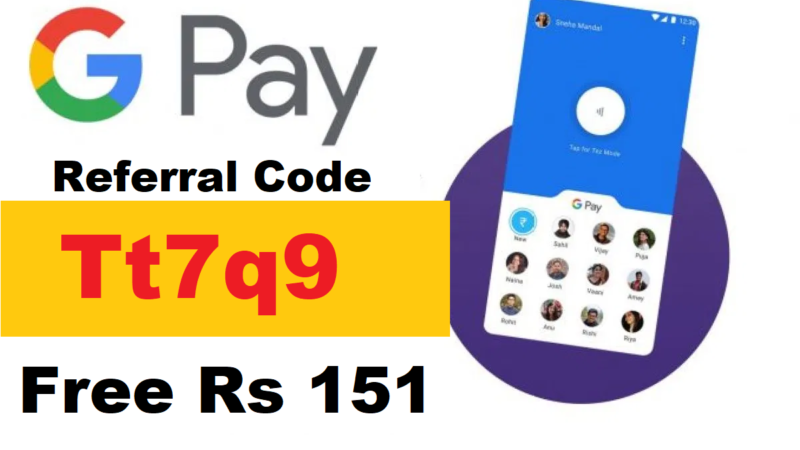
Google Pay Referral Code: Tt7q9 Download Google Pay Wallet Payment App, Google Pay UPI Payment App, Google Pay Refer and Earn, Pay Referral Code & Link, Google Pay Scratch Card Offer, Google Pay Cashback Offer. Invite friends to Pay , and you each get ₹151. Just share your unique invite link/Referral Code and make sure that your referrer downloads Pay from it. Get a Lucky Sundays scratch card for a chance to win ₹1 lakh. More Refer and Earn App/Website. Google Pay Referral Code: Tt7q9
Google Pay Referral Code 2023:
Google Pay Referral Code: Tt7q9 Check out Pay , a simple and secure payments app by Google. Make your first payment and we both get ₹51! https://g.co/tez/Tt7q9 Referral code Referral reward earned (Tt7q9)! You can earn more rewards by referring your friends to Pay . Send them your referral code (Tt7q9). Invite friends
Join me on Google Pay, a secure app for money transfers, bills and recharges. Enter my code Tt7q9 to earn ₹21 back on your first payment! https://g.co/payinvite/Tt7q9
Google Pay Referral Code
Tt7q9
Using Referral Link Get
1st UPI Get Rs 151 CB
Earn per Referral
Rs 151
Invite a Friend program
Only For App
Google Pay Redeem
100% Use
Use Google Pay Referral Code Tt7q9 (https://g.co/payinvite/Tt7q9) and get 9000 rupees free. Google has launched own Mobile wallet and UPI App for payments in India. It is very fast and very secure app. it is offering free referral Commission to you if you refer your friends.
Google Pay Refer 2 Friends Get Extra Scratch Card
Use Google Pay Referral Code: Tt7q9
Get an extra bonus scratch card of ₹50 – ₹100
When you refer 2 or more people this week
Get an extra bonus scratch card of ₹50 – ₹100
Offer expires 6 December 2017
Offer summary item background image
This week, we’re giving you an *extra Thank You* for sharing Pay with your friends.
Google Pay Referral Code: You may already know you can invite someone to Pay , and you each get ₹51 when your referral makes their first payment. And for this week only, you’ll get an ?extra bonus scratch card? worth between ₹50-₹100 when you successfully refer 2 or more people before December 6th, 2017. Expect your scratch card reward within 7 days of your second successful referral. How to make a successful referral: just share your unique invite link https://g.co/payinvite/Tt7q9and make sure your friend downloads Pay from it and makes a transaction.
How to Download Google Pay to Get Free Rs 51 on 1st UPI Transaction:
Enter Mobile Number Note: Add The Number On Which You have Bank Account
Enter OTP & Verify it
Apply Google Pay Referral Code: Tt7q9
Choose Mail ID
Tap on Add Bank Account
Select your bank account
Tap on Proceed Button Enter Debit/ATM Card last 6 digits Number & Expires Number
Tap on Proceed Button
After Successfully Added Now Again Go To Dashboard Of The App > Click On “New” Under PAYMENTS Options
Send Rs 1 on This UPI Id qqq@upi send Rs 1 to Get Rs 51 Cashback OR Scan This QR Code and Send Rs 1 to Get Rs 1 Cashback
Make 1st UPI Transaction you will get Rs 50 Cashback in your GPay Wallet
That’s it Enjoy this Offer
TERMS & CONDITIONS
Your friend must sign up through your unique Pay invite link https://g.co/tez/Tt7q9.
Your friend must successfully complete a payment using the GPay app
You can earn a maximum of ₹9,000 per financial year (1 April to 31 March). • See complete terms and conditions.
GPay get paid ₹150+ Free Scratch Card up to Rs 1000:
Send ₹500 or more
Pay or get paid ₹150 or more
Get a scratch card worth up to ₹1,000 for each person
Offer expires 22 January 2018
GPay Scratch Card Details:
When you send or receive money with someone new, you each earn a scratch card that can contain up to ₹1,000 (up to 5 cards per week). Both people get cards, so find your friends on GPay now! When you Apply Google Pay Referral Code You will Get Free Scratch Card. The offer will automatically apply to each new person that you transact with this week. And if you win, the money goes right in to your bank account.
GPay Send ₹500+ Luck Fridays Scratch Card
Get a Lucky Fridays scratch card that could win you ₹100,000
Send ₹500 or more
Next drawing 19 January 2018
GPay App Buy a Woohoo gift card of ₹1000 or more
Get a scratch card from ₹20 to ₹1000
From Team GPay
Shop at Woohoo
Offer expires 31 January 2018
GPay Woohoo Scratch Card Offer:
??Make gift giving even more rewarding.?? This holiday season, make any gift card purchase from Woohoo (www.woohoo.in) of ₹1000 or more and earn a scratch card worth from ₹20 up to ₹1000 from any of their merchants. Just enter your GPay UPI ID as the payment option on the Woohoo website or app. As a special bonus, Woohoo is also giving 2% to 20% rewards, valued up to ₹200, with purchases paid directly into your Woohoo account when you purchase a gift card from select retailers, to access over 100+ top brands.
GPay Luck Fridays Scratch Card Offer Trick:
Each week we’re rewarding everyone who sends a payment of ₹500 or more with a Lucky Fridays scratch card that could reveal ₹100,000. Use GPay to send money home, pay your rent or transfer funds to friends and family. And on Friday at 10.00 a.m., the scratch card activates so you can find out if it contains your lucky 100,000. Your first eligible transaction each week starting on Friday at 9.00 a.m. will automatically enter you into the draw that happens the following Friday.
Google Pay Refer and Earn:
Open Google Pay UPI Payment App
Tap on Right Menu Bar
you will see Google Pay Referral Code to GPay and you each get Rs 51 Banner
Tap on See Offer Details
Tap on Invite Friends and Share your Google Pay Referral Code with your Friends & Family
How to Add Bank Account in Google Pay Wallet App:
After Successfully Signup Go to Add Bank Account at Top Side
Choose Bank Account
Enter ATM details Last 6 digit Number & Expiry Date
You will Receive OTP Verify You Successfully Added Bank Account
You Can Use for UPI Transaction.
How to Send Money Using Google Pay Wallet App:
After Successfully Above Registration & Add Bank Account Step
Open App Tap on New
Enter GPay Mobile Number, Name/ Account Number/ UPI ID, QR, Phone
Select Payment Method After Entering These Details Enter Amount Process
Get a Lucky Sundays scratch card for a chance to win ₹1 lakh
From Team GPay PAY NOW
Google Pay Customer Care Number & Support Mail id:
Want to share feedback? Write to us on http://support.google.com/tez or tap ‘Send feedback’ from within the app menu. Google Pay Referral Code: Tt7q9
Send money to friends, instantly receive payments directly to your bank account & pay the nearby café with GPay, Google’s new digital payment app for India. Using NPCI’s (National Payments Corporation of India) Unified Payments Interface (UPI), money transfers are simple & secure with GPay .
Top Features
Transfer directly to your bank account. Simply link your account to GPay over UPI and instantly transfer money from bank to bank.
Know your money is secure.
With GPay’s Cash Mode, you can instantly send or receive payments to anyone nearby without sharing personal details like your phone number or bank account
GPay makes bill payments simple. Pay for electricity, gas, water, DTH, post-paid mobile, and more. You only need to link your biller accounts once to pay your bill anytime with just a few taps. GPay supports Bharat BillPay with access to over 80+ billers across the country. Google Pay Referral Code: Tt7q9
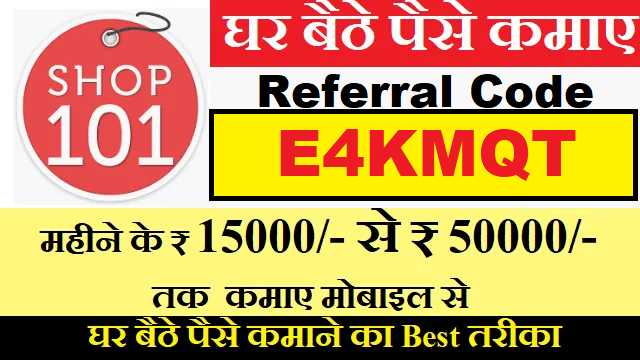
Download APK Shop101 Referral Code: E4KMQT Get Free Rs 200 Credit. Get your own beautiful online store. Sell at zero commission. Resell the lowest cost products at wholesale prices. Courier across India (26000+ PIN codes). Provide COD (Cash On Delivery). Work from the comfort of your home. Even as a part-time job. Total credit earned:₹200 Friend gets Rs. 200 on using your referral code. You earn Rs. 200 on 1st order by friend. Use registered phone number as referral code.
Online reselling has been made easy and rewarding with Shop101, a trusted platform for starting your online business with zero investment. With Shop101’s referral code “E4KMQT,” not only do you get a flat 30% off on your first order, but you also have an opportunity to earn up to 20% commission from each sale you make. Here’s how you can kickstart your online reselling journey with Shop101 and make money online without leaving your home.
[copy text=”Click to copy Shop101 Referral Code E4KMQT” content=”E4KMQT”]
Hi, I use Shop101 to Sell Online and I bet you’ll love it. Boost Sales with COD, Free Website, and multiple Shipping Partners. Get Free Shipping worth Rs.200 using my shop101 referral code – E4KMQT. Download Shop101 app and enter the code on ‘Refer and earn’ screen. Download Now – https://www.shop101.com/app?d-24
Shop101 Referral Code
E4KMQT
Using Shop101 Referral Code Get
Free Rs 200
Earn per Referral
Rs 200
Invite a Friend program
Only For App
Shop101 Redeem Point
Shopping
shop101 referral code: E4KMQT
Shop 101 referral code “E4KMQT” . You will get flat 30% off on your first order apply coupon code FREE30. refer and earn up to 20% commission from each sale. Enter the shop101 referral code in enter referral code place.
Terms & Conditions
In order to avail the referral benefit, your seller friend (called “referred seller” below) must process his/her 1st order using Shop101 shipping partners.
Referral credits can be used for orders delivered through Shop101 shipping partners only.
You and your referred seller friend will be rewarded with shipping credits in your accounts respectively, once you have’ve met the desired condition.
Shop101 decision with respect to referral benefits will be final and binding.
How to Get Free Rs 200 Using Shop101 Referral Code:
Go to Menu Tap on Refer and Earn Enter This Shop101 Referral Code: E4KMQT
You will Get Free Rs 200 Use for Shopping that’s it
Shop101 Refer and Earn:
Open Shop101 App
Register or Login into the App
Go to Menu >> Tap on Refer and Earn
Share Your Shop101 Referral Code with Friends and Family
You can Earn Rs 200 Per Referral
Looking for ways to Earn Money Online without investment? Or for Best Work From Home Jobs & Part-Time Jobs Online to make money from home? Or the best app to start your own Online Reselling Business? Download Shop101: #1 Trusted Online Reselling App, work from home & earn money online with ZERO investment!
Shop101 Refer and Earn
WHY is Shop101 the best Online Earning App?
Made In India, For India 🇮🇳
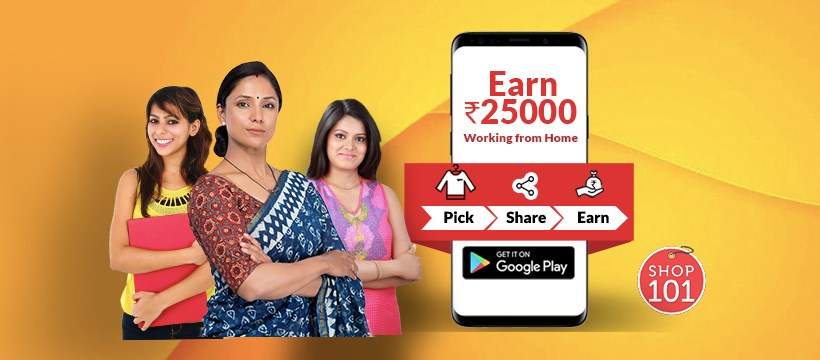
Our Mission To enable the next billion Indian housewives, mothers, college students, women entrepreneurs, shop & boutique owners, beauticians, wholesale traders or anyone looking for part-time jobs online, work from home jobs, online jobs from home, home-based jobs to make money online & earn ₹25,000 per month.
#1 Trusted Online Reselling App Shop101 is trusted by 90 Lakh+ Registered Resellers & 20,000+ Wholesalers across India! We have successfully processed 1 Crore+ Orders worth more than ₹1000 Crores
HOW to Earn Money Online with Shop101 App?
🛍️ PICK products from our list of trendy & best-selling products like sarees, Kurtis, dress materials, etc. at wholesale price & add your margins. Get regular notifications for new products and trends. 🔗 SHARE product images & videos with friends, family or directly to your Facebook wall, Facebook marketplace, WhatsApp groups, WhatsApp business, Sharechat profile & more to get orders. 💰 EARN – You can place orders on behalf of your customers and earn on each sale. Your margin will be credited directly into your bank account after the delivery of the product. That’s it! making money online is that easy!
SHOP101 #1 TRUSTED ONLINE RESELLING APP Changing livelihoods and empowering millions of mothers, students, homemakers, and working professionals to become independent and earn from home.
Shop101, a Glance company has been empowering individuals like homemakers and students to become entrepreneurs since 2015. Anyone with an entrepreneurial streak can start their own business with zero investment. To date, over 10,000 suppliers and 1 Crore + resellers have registered with Shop101. Shop101 and Glance are set to transform the shopping experience of consumers on mobile lock screens led by sellers, celebrities and influencers which is touted as the future of e-commerce globally.
Shop101: Your Trusted Partner for Online Reselling:
Shop101 is an online platform that provides you with a unique opportunity to start your own online reselling business without any investment. All you need to do is to download the Shop101 app, choose from a plethora of products, and start selling them at a profit from your home. From work-from-home jobs to part-time online opportunities, Shop101 brings you the best ways to earn money online.
Shop101 Referral Code “E4KMQT”: Savings and Earnings
Shop101’s referral code “E4KMQT” is a fantastic way to start your online reselling journey while enjoying savings and earnings. By applying this code, you can get a flat 30% discount on your first order. Moreover, by referring Shop101 to others, you can earn a commission of up to 20% from each sale they make.
Frequently Asked Questions about Shop101 Referral Code:
How do I apply the Shop101 Referral Code “E4KMQT”?
To apply the code, download the Shop101 app, create an account, and find the section where you can enter the referral code. Insert “E4KMQT” and enjoy a flat 30% discount on your first order.
How does the Shop101 referral system work?
Once you’re a Shop101 user, you can earn by referring others to Shop101. If your referred friends or family use your referral code and make a sale, you earn up to a 20% commission from that sale.
How do I start my online reselling business with Shop101?
Starting an online reselling business with Shop101 is quite simple. Download the Shop101 app, register an account, and start choosing products that you wish to resell. List them on your account, and you’re all set to start your online business.
What if I have no prior experience in reselling?
Shop101 is designed to be user-friendly and doesn’t require any prior experience in reselling. They have a helpful support team to assist you if you encounter any problems or need guidance.
Conclusion:
Shop101 provides a golden opportunity to start your online reselling business from home with zero investment. The Shop101 referral code “E4KMQT” further enhances this experience by offering a flat 30% discount on your first order and allowing you to earn up to 20% commission from each sale through referrals. So, why wait? Download the Shop101 app today, use the referral code, and start your journey towards financial independence.
Keywords: Shop101 Referral Code, E4KMQT, Earn Money Online, Work From Home, Part-Time Jobs Online, Online Reselling App, Zero Investment.